
“Table 4 asked for one more dosa. The paper slip never reached the kitchen.”
With DelobeeThe waiter adds it on the phone. It shows up on the kitchen screen, or prints as an “added items” KOT.
 Restaurant POS for cafés & small restaurants
Waiters take orders on their phones, the kitchen sees them on a screen or printed KOT, and the cashier bills with GST and a UPI QR. Made for small cafés and restaurants in India.
14 days free · no card needed
Opens the Delobee app. Tap Create my restaurant, answer a few questions, and practise with a sample order. Nothing is real until you launch.


01How an order moves
Everyone uses the same app on their own phone. Each person only sees the screen for their job.
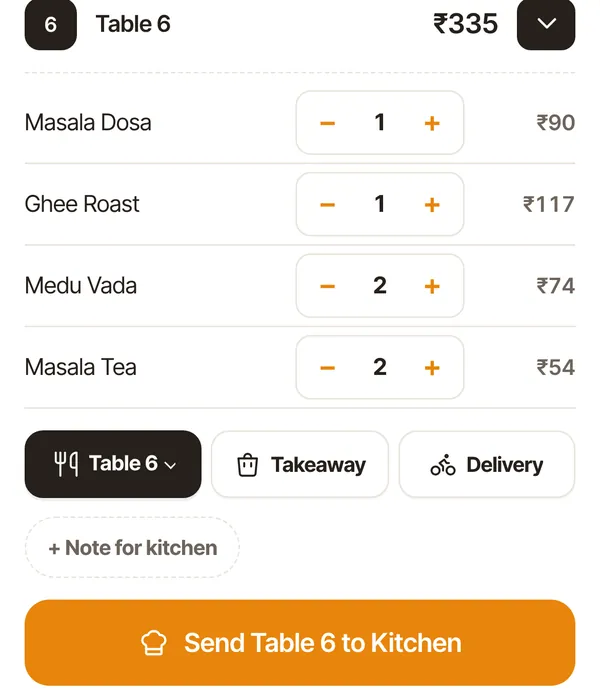
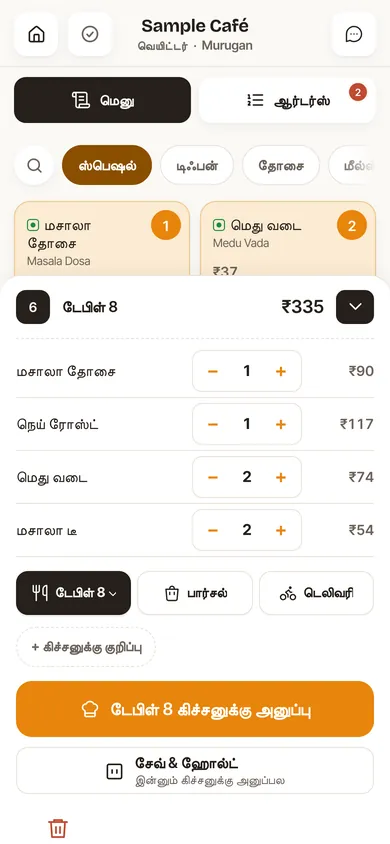
Tap dishes, add notes like “Less spicy”, pick the table and send.
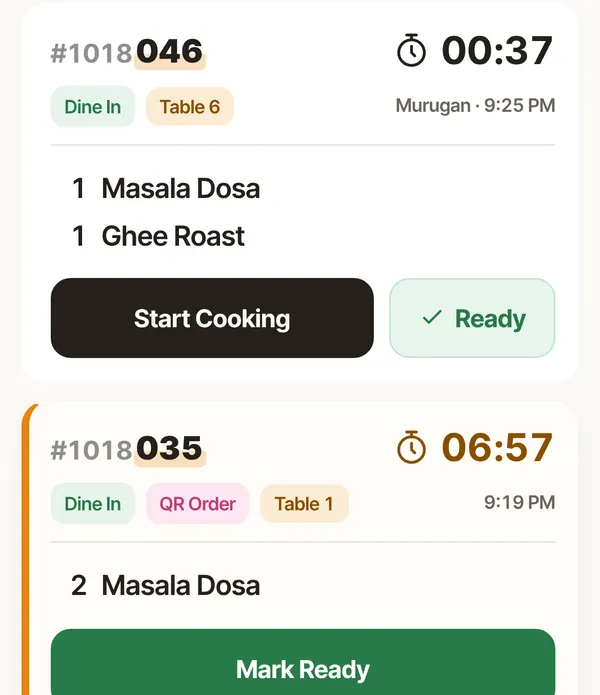
Each counter gets its own tickets with a timer. Tap Start Cooking, then Ready — the waiter hears it.
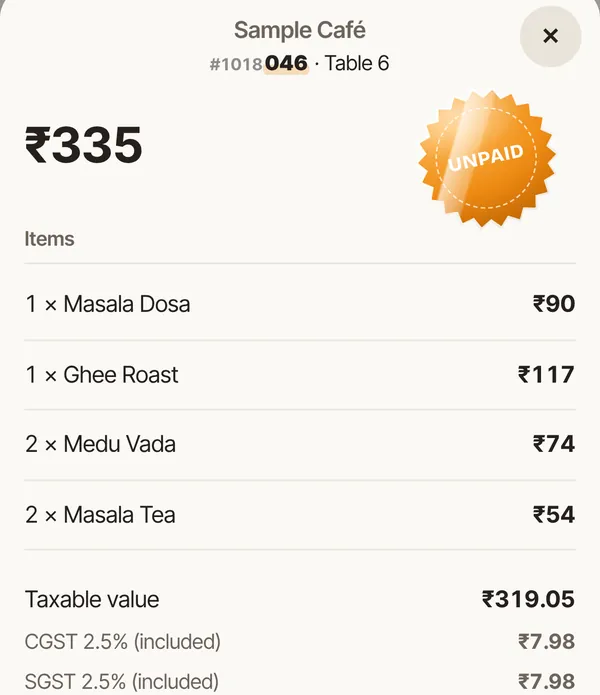
GST is worked out for you. Take UPI, cash or card, or send the bill on WhatsApp.
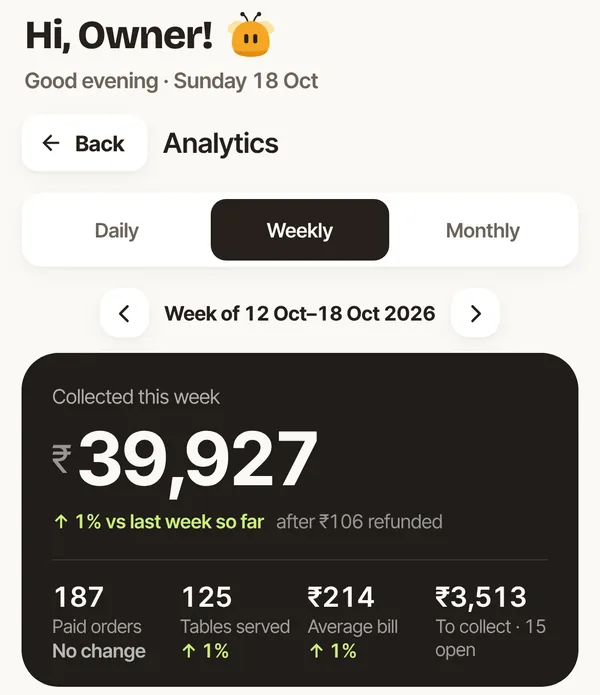
Sales, what’s still to collect and your best sellers — on your phone, wherever you are.
02Rush hour
“Table 4 asked for one more dosa. The paper slip never reached the kitchen.”
With DelobeeThe waiter adds it on the phone. It shows up on the kitchen screen, or prints as an “added items” KOT.
“Which table is this for?” — shouted across the kitchen, again.
With DelobeeEvery ticket shows the table, the waiter and a timer. Late tickets stand out, so nothing waits too long.
“Totals on a calculator, GST worked out by hand, guests waiting.”
With DelobeeThe bill adds up by itself with CGST and SGST, and shows a UPI QR for the exact amount.
“At closing, the cash in the drawer doesn’t match the day.”
With DelobeeEvery payment is recorded as UPI, cash or card. Discounts and refunds are on record. Close the Day shows what came in.
03Try before you sign up
You don’t fill a form or talk to a salesperson. You set up your own restaurant in the app and practise with sample orders. Sign up only when you’re ready to go live.
Your restaurant’s name, how many tables, who takes payment and which counters cook. GST can wait.
From a PDF or a photo of your menu, or pick from about 800 common Indian dishes.
A one-minute guided tour walks one order from table to kitchen to bill.
Create your account, and your 14 free days begin. Practice orders are cleared.
Recreated from the app’s practice screen
04Features
Every feature is in the one plan — the kitchen screen, QR ordering and reports included.
Tap dishes, pick a table, takeaway or delivery, and send. Save & Hold if the guest isn’t ready.
“Less spicy”, “No onion”, an order note for the kitchen, and Half / Full prices.
Each counter sees only its own dishes, with a timer on every ticket.
Tickets print on a thermal printer in the kitchen. How KOT printing works
Guests scan the table QR and order from their phone. They pay your staff as usual.
Mark a dish sold out, or available only mornings or evenings. Waiters see it at once.
Phones keep taking orders and sync when the internet is back.
Your GSTIN, CGST and SGST, prices inclusive or exclusive of GST, invoice numbers per financial year.
Add your UPI ID and guests scan to pay the right amount. Money goes straight to you.
Share the bill link on WhatsApp, show it as a QR, or print it.
Split one bill between friends, combine tables, or take two payment methods.
Set a maximum discount and decide which roles can give one.
They need the right role, and every one is logged with who did it.
Today’s sales, money still to collect, best sellers and busy hours, compared with last week.
An end-of-day report so the day’s money adds up.
Monthly and yearly Excel workbooks, plus bill history you can search and reprint.
Waiter, kitchen, cashier, admin. Each person signs in with their own pattern and sees only their screens.
Staff clock in and out on their phone, and the owner can correct a missed shift.
05Your team
Each person chooses their own language. The waiter can work in Tamil while you check sales in English.
06What you need
No billing machine, no installation visit. Open it in the browser and start.
Works in Chrome on Android and Safari on iPhone. Add it to the home screen and it opens like an app.
Phones keep taking orders and sync on their own when the internet is back.
While offline, phones can’t see each other’s new orders, and closing the day needs every phone online.
The kitchen screen works without one. For paper KOTs, add a 58 or 80 mm thermal printer. Bills print from the phone’s print option.
KOT printing & kitchen screen07Your data & money
Delobee is new. Here is exactly what it does with your money and records.
Guests pay your UPI ID, cash or card as usual. Delobee only records the amount and how it was paid.
Only the roles you allow can give them, and each one stays on record with who did it.
Your restaurant’s data is stored with Cloudflare. We never sell data and don’t show ads.
Download monthly and yearly Excel reports any time — even if your account becomes read-only.
The owner can delete the account from inside the app. No email, no call needed.
08Pricing
Try everything free for 14 days. Pay only if you want to keep going.
DelobeeAbout ₹642 a month — roughly ₹21 a day.
Cancel anytime.
14 days free · no card needed
Prices shown in the app before you pay. GST, if any, is confirmed before you pay. Nothing is charged automatically — no card or AutoPay mandate. If the trial or a paid period ends unpaid, you keep full access for 7 more days, then the account becomes read-only.
No. You get 14 days free and no card is needed. Nothing is charged during the 14 days. After that, you pay only if you choose a plan.
Yes. Open the app, tap Create my restaurant, answer a few questions and take practice orders. Nothing in practice mode is real. You create your account only when you tap Launch.
₹799 a month, or ₹7,699 a year (about ₹642 a month). The price is shown in the app before you pay.
Every feature is included, for 1 restaurant with up to 30 staff. There are no paid add-ons for the kitchen screen, QR ordering or reports.
Yes. Each person picks Tamil or English on their own phone, and dish names show in Tamil with the English name underneath. Bills, customer pages and printed KOTs stay in English.
Phones keep taking orders and sync when the internet is back. Until then, phones can’t see each other’s new orders, and closing the day needs every phone online.
No. Delobee runs in the browser on Android phones, iPhones and tablets you already have. A thermal printer for KOTs or bills is optional.
Upload a PDF or a photo of your menu, paste the text from WhatsApp, or pick from a library of about 800 common Indian dishes. You check the list before anything is added.
Yes. Bills show your GSTIN with CGST and SGST, prices can include or exclude GST, and invoice numbers run per financial year. You can also set up GST later. Monthly and yearly Excel records are ready for your CA.
Yes. Add your UPI ID and the bill shows a UPI QR with the exact amount. You can also show the bill as a QR code or share it on WhatsApp. Delobee records the payment; the money goes straight to your UPI ID.
Nothing is charged automatically: there is no card or AutoPay mandate. If the free trial or a paid period ends without payment, you keep full access for 7 more days, then the account becomes read-only. Your records stay open, so you can still download them.
Open the app, tap Join my restaurant and enter the team code your owner gives you. You sign in by drawing your own pattern.
Set up takes a few minutes on your phone. Nothing is real until you launch.
14 days free · no card needed